Introduction: In this article I am going to explain with example How to encrypt and decrypt or we can say encode and decode login credentials e.g. username and password and store in Sql Server Database using Asp.net with both C# and Vb.Net Language.
 |
| Click on the image to enlarge |
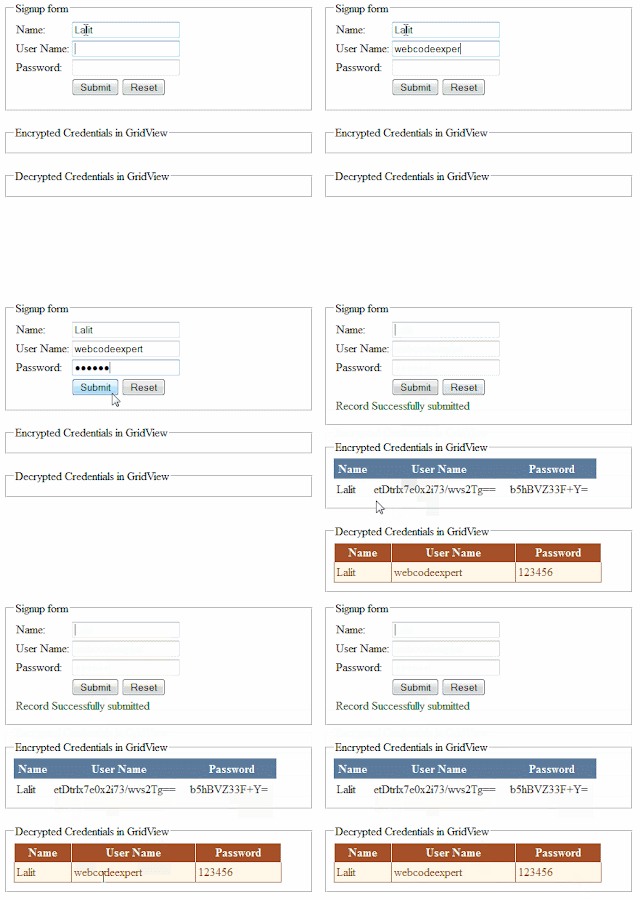
Description: In previous article I explained How to Encrypt Query String in asp.net(C#, VB) | Encrypting and Decrypting Query String in asp.net(C#, VB) and How to Encrypt connection string in web.config | How to Decrypt connection string in web.config and Encrypt and Decrypt connectionString in web.config file using code in asp.net.Now in this article I will store/save User Name and Password in the Sql Server Database in encrypted form. Also the Encrypted credentials i.e. user Name and Password will be binded in the first Grid View and In the second Grid View decrypted credentials will be binded as shown in the demo image above.
Implementation: Let’s create an asp.net web application to understand the concept of encrypting and decrypting username and password.
- First of all we need to create a DataBase in Sql Server. So create a Database and name it “MyDatabase” or whatever you want. Create a table with the fields and Data type as shown below and name it “Tb_Login”.
Column Name
|
Data Type
|
Id
|
Int(Primary Key so set is identity=true)
|
Name
|
varchar(100)
|
UserName
|
varchar(100)
|
Password
|
varchar(100)
|
- Now In the web.config file create the connection string to connect the web application with the database as:
<connectionStrings>
<add name="conStr" connectionString="Data Source=LocalServer;Initial Catalog=MyDataBase;Integrated Security=True"/>
</connectionStrings>
Source Code
- In the <Form> tag of the design page (.aspx) place 3 TextBox control, a label and Two Button controls from the standard category of the visual studio’s toolbox, 3 RequiredFieldValidator validation controls for each textbox from the validation Category, and also place Two GridView data controls from the Data category and design the page as shown below.
<div>
<fieldset style="width:400px;">
<legend>
Signup form
</legend>
<table>
<tr>
<td>Name: </td><td>
<asp:TextBox ID="txtName" runat="server"></asp:TextBox><asp:RequiredFieldValidator
ID="rfvName" runat="server" ErrorMessage="Please enter Name"
ControlToValidate="txtName" Display="Dynamic" ForeColor="Red"
SetFocusOnError="True"></asp:RequiredFieldValidator></td>
</tr>
<tr>
<td>User Name: </td><td>
<asp:TextBox ID="txtUserName" runat="server"></asp:TextBox><asp:RequiredFieldValidator
ID="rfvuserName" runat="server"
ErrorMessage="Please enter User Name" ControlToValidate="txtUserName"
Display="Dynamic" ForeColor="Red" SetFocusOnError="True"></asp:RequiredFieldValidator></td>
</tr>
<tr>
<td>Password: </td><td>
<asp:TextBox ID="txtPwd" runat="server" TextMode="Password"></asp:TextBox><asp:RequiredFieldValidator
ID="rfvpwd" runat="server"
ErrorMessage="Please enter Password" ControlToValidate="txtPwd"
Display="Dynamic" ForeColor="Red" SetFocusOnError="True"></asp:RequiredFieldValidator></td>
</tr>
<tr>
<td> </td><td>
<asp:Button ID="btnSubmit" runat="server" Text="Submit"onclick="btnSubmit_Click"/>
<asp:Button ID="btnReset" runat="server" Text="Reset" CausesValidation="False"
onclick="btnReset_Click" /></td>
</tr>
<tr>
<td colspan="2">
<asp:Label ID="lblSignUpStatus" runat="server" Text="" style="color: #006600"></asp:Label></td>
</tr>
</table>
</fieldset>
<br />
<fieldset style="width:400px;">
<legend>Encrypted Credentials in GridView</legend>
<asp:GridView ID="grdEncryptedCredentials" runat="server"
AutoGenerateColumns="False" CellPadding="4" ForeColor="#333333"
GridLines="None" Width="362px">
<AlternatingRowStyle BackColor="White" ForeColor="#284775" />
<Columns>
<asp:BoundField HeaderText="Name" DataField="Name" />
<asp:BoundField HeaderText="User Name" DataField="UserName" />
<asp:BoundField HeaderText="Password" DataField="Password" />
</Columns>
<EditRowStyle BackColor="#999999" />
<FooterStyle BackColor="#5D7B9D" Font-Bold="True" ForeColor="White" />
<HeaderStyle BackColor="#5D7B9D" Font-Bold="True" ForeColor="White" />
<PagerStyle BackColor="#284775" ForeColor="White" HorizontalAlign="Center" />
<RowStyle BackColor="#F7F6F3" ForeColor="#333333" />
<SelectedRowStyle BackColor="#E2DED6" Font-Bold="True" ForeColor="#333333"/>
<SortedAscendingCellStyle BackColor="#E9E7E2" />
<SortedAscendingHeaderStyle BackColor="#506C8C" />
<SortedDescendingCellStyle BackColor="#FFFDF8" />
<SortedDescendingHeaderStyle BackColor="#6F8DAE" />
</asp:GridView>
</fieldset>
<br />
<fieldset style="width:400px;">
<legend>Decrypted Credentials in GridView</legend>
<asp:GridView ID="grdDecryptedCredentials" runat="server"
AutoGenerateColumns="False" BackColor="#DEBA84" BorderColor="#DEBA84"
BorderStyle="None" BorderWidth="1px" CellPadding="3" CellSpacing="2"
Width="369px">
<Columns>
<asp:BoundField HeaderText="Name" DataField="Name" />
<asp:BoundField HeaderText="User Name" DataField="UserName" />
<asp:BoundField HeaderText="Password" DataField="Password" />
</Columns>
<FooterStyle BackColor="#F7DFB5" ForeColor="#8C4510" />
<HeaderStyle BackColor="#A55129" Font-Bold="True" ForeColor="White" />
<PagerStyle ForeColor="#8C4510" HorizontalAlign="Center" />
<RowStyle BackColor="#FFF7E7" ForeColor="#8C4510" />
<SelectedRowStyle BackColor="#738A9C" Font-Bold="True" ForeColor="White"/>
<SortedAscendingCellStyle BackColor="#FFF1D4" />
<SortedAscendingHeaderStyle BackColor="#B95C30" />
<SortedDescendingCellStyle BackColor="#F1E5CE" />
<SortedDescendingHeaderStyle BackColor="#93451F" />
</asp:GridView>
</fieldset>
</div>
C#.Net Code for encrypting and decrypting username and password and save in Sql Server Database
- In the code behind file (.aspx.cs) write the code as:
First include these following namespace also:
using System.Security.Cryptography;
using System.IO;
using System.Text;
using System.Data;
using System.Data.SqlClient;
using System.Configuration;
Then write the code as:
SqlConnection con = newSqlConnection(ConfigurationManager.ConnectionStrings["conStr"].ConnectionString);
protected void Page_Load(object sender, EventArgs e)
{
if (!Page.IsPostBack)
{
BindEncryptedCredentials();
BingDecryptedCredentials();
}
}
private void BindEncryptedCredentials()
{
SqlCommand cmd = new SqlCommand("select * from Tb_Login", con);
try
{
if (con.State == ConnectionState.Closed)
{
con.Open();
}
SqlDataAdapter adp = new SqlDataAdapter(cmd);
DataTable dt = new DataTable();
adp.Fill(dt);
if (dt.Rows.Count > 0)
{
grdEncryptedCredentials.DataSource = dt;
grdEncryptedCredentials.DataBind();
}
else
{
grdEncryptedCredentials.DataSource = null;
grdEncryptedCredentials.DataBind();
}
}
catch (Exception ex)
{
Response.Write("Error occured :" + ex.Message.ToString());
}
finally
{
cmd.Dispose();
con.Close();
}
}
private void BingDecryptedCredentials()
{
SqlCommand cmd = new SqlCommand("select * from Tb_Login", con);
try
{
if (con.State == ConnectionState.Closed)
{
con.Open();
}
SqlDataAdapter adp = new SqlDataAdapter(cmd);
DataTable dt = new DataTable();
adp.Fill(dt);
if (dt.Rows.Count > 0)
{
for ( int i = 0; i < dt.Rows.Count; i++)
{
string uName = dt.Rows[i]["userName"].ToString();
string pwd = dt.Rows[i]["Password"].ToString();
dt.Rows[i]["userName"]= Decrypt(uName);
dt.Rows[i]["Password"] = Decrypt(pwd);
}
dt.AcceptChanges();
grdDecryptedCredentials.DataSource = dt;
grdDecryptedCredentials.DataBind();
}
else
{
grdDecryptedCredentials.DataSource = null;
grdDecryptedCredentials.DataBind();
}
}
catch (Exception ex)
{
Response.Write("Error occured :" + ex.Message.ToString());
}
finally
{
cmd.Dispose();
con.Close();
}
}
protected void btnSubmit_Click(object sender, EventArgs e)
{
string uName = string.Empty;
string uPwd = string.Empty;
SqlCommand cmd = new SqlCommand("insert into Tb_Login(Name,UserName,Password) values (@Name,@UserName,@Password)", con);
if (con.State == ConnectionState.Closed)
{
con.Open();
}
try
{
uName = Encrypt(txtUserName.Text.Trim());
uPwd = Encrypt(txtPwd.Text.Trim());
cmd.Connection = con;
cmd.CommandType = CommandType.Text;
cmd.Parameters.AddWithValue("@Name", txtName.Text.Trim());
cmd.Parameters.AddWithValue("@UserName", uName);
cmd.Parameters.AddWithValue("@Password", uPwd);
cmd.ExecuteNonQuery();
lblSignUpStatus.Text = "Record Successfully submitted";
Clear_Controls();
BindEncryptedCredentials();
BingDecryptedCredentials();
}
catch (Exception ex)
{
Response.Write("Error occured: " + ex.Message.ToString());
}
finally
{
uName = string.Empty;
uPwd = string.Empty;
con.Close();
cmd.Dispose();
}
}
public string Encrypt(string str)
{
string EncrptKey = "2013;[pnuLIT)WebCodeExpert";
byte[] byKey = { };
byte[] IV = { 18, 52, 86, 120, 144, 171, 205, 239 };
byKey = System.Text.Encoding.UTF8.GetBytes(EncrptKey.Substring(0, 8));
DESCryptoServiceProvider des = new DESCryptoServiceProvider();
byte[] inputByteArray = Encoding.UTF8.GetBytes(str);
MemoryStream ms = new MemoryStream();
CryptoStream cs = new CryptoStream(ms, des.CreateEncryptor(byKey, IV),CryptoStreamMode.Write);
cs.Write(inputByteArray, 0, inputByteArray.Length);
cs.FlushFinalBlock();
return Convert.ToBase64String(ms.ToArray());
}
public string Decrypt(string str)
{
str = str.Replace(" ", "+");
string DecryptKey = "2013;[pnuLIT)WebCodeExpert";
byte[] byKey = { };
byte[] IV = { 18, 52, 86, 120, 144, 171, 205, 239 };
byte[] inputByteArray = new byte[str.Length];
byKey = System.Text.Encoding.UTF8.GetBytes(DecryptKey.Substring(0, 8));
DESCryptoServiceProvider des = new DESCryptoServiceProvider();
inputByteArray = Convert.FromBase64String(str.Replace(" ", "+"));
MemoryStream ms = new MemoryStream();
CryptoStream cs = new CryptoStream(ms, des.CreateDecryptor(byKey, IV),CryptoStreamMode.Write);
cs.Write(inputByteArray, 0, inputByteArray.Length);
cs.FlushFinalBlock();
System.Text.Encoding encoding = System.Text.Encoding.UTF8;
return encoding.GetString(ms.ToArray());
}
private void Clear_Controls()
{
txtName.Text = string.Empty;
txtPwd.Text = string.Empty;
txtUserName.Text = string.Empty;
txtName.Focus();
}
protected void btnReset_Click(object sender, EventArgs e)
{
Clear_Controls();
lblSignUpStatus.Text = string.Empty;
}

